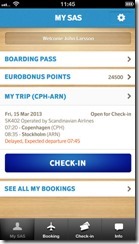
 Scandinavian Airlines (or SAS) has released a new app for iPhone (and Android if I’m not mistaken). The app allows you to see your upcoming trips, your Eurobonus points, boarding pass, buy tickets etc. I have downloaded it and I think it looks quite good. I was also impressed that all my upcoming flights were in the list – even the ones with Thai Airways and Singapore Airlines. You can read more about the application on this iTunes page. Which other airlines have a good app?
Regards
Gard
http://gardkarlsen.com – trip reports and pictures
 I love the iPhone as a travel gadget – there are lots of very useful tools (and quite a number of rubbish tools as well) that you can download as apps. AOLTravel has looked into that and here is their list of the 11 best travel apps. One of the apps on the list this year is Gowalla , the app that allows you to check in at places when you travel, write something about them and build a sort of virtual passport as you go along. I think it is a fun app and you can see my profile on http://gowalla.com/users/gardkarlsen . I think Google MyMaps is probably the best travel tool on the iPhone but note that accessing the internet and using apps that require data traffic can be very, very expensive indeed (I experienced this in 5 minutes in Shanghai). The solution can be to buy a new sim card when you travel as that is normally not that expensive. What are your favorite travel apps?
 Good news people – according to Norwegian newspapers, Avinor will introduce free wi-fi on Norwegian airports very soon. The rumor says that the free wi-fi will be available already in May/June 2011 on the larger airports in Norway. I was just at Geneva airport and I was happy and surprised to see that they had a free wi-fi network and hopefully the setup will be as easy on the Norwegian airports as well. But I guess time will tell
A few years back Google introduced the service known as Street View. They basically take car and drive through the city strrets and they take photos. This is linked up to Google Maps and this means that you can take virtual walks in cities like London, New York, Paris etc. But now the turn has finally come to my beloved hometown Stavanger  It seems like the photos have been taken on a pretty nice autumn day last year and you can walk around a lot of the streets in downtown Stavanger. So the only thing missing now Google is a good satellite image of the city center itself!! So start by a walk from the Norwegian Petroleum museum, Or maybe walk past the iron age farm, check out the beach at Sola, check out the view of the city from the bridge leading over to Hundvåg etc. Welcome to Stavanger…both virtually and in real life
 After years of planning, building, testing, delays etc I’m happy to inform you that Boeing’s new 787 (aka Dreamliner) plane has successfully completed its first test flight in the US. You can read more about this on BBC and even see the TV coverage of the event. You can also read more about this on Boeing’s site . According to BBC the Dreamliner project has been delayed for 2 1/2 years due to various problems. When the Airbus A380 it seemed like Boeing were having a field day so I guess it is only fair that their project has also run into some problems. But now, a new plane is born and I look forward to trying it sooner or later. The first customer to get the 787 is ANA and that will be before the end of 2010.
As some of you have noticed, I’m a bit of a fan of Google…and one of the greatest tools is Google maps which I have used to map out cities that I have been to (see an example in my Rome Google map). In connection with the Google maps there is also another great tool called Google Street View. Some cities around the world have been photographed on street level and this allows the user to walk virtually through the cities – this means that you can e.g. check out the area around the hotel that you are about to book, or “walk” to the restaurant that you are thinking about visiting etc. If you are wondering which cities that have been mapped please check out this Wikipedia page. So how about walking past Collosseum in Rome to get an idea of how it looks Just zoom in on the city and drag the little orange map into the street that you want to take a closer look at and then start by moving around by clicking on the arrows that run along the street. Here is my Rome trip report in case you need some more background information: http://gardkarlsen.com/rome_italy.htm

 I got a copy of the Globetrotter’s handbook a couple of years back and I think it is a fun tool if you are backpacking through lots of countries as you get info on countries, there are maps, you can write down your flights, vaccination register, conversion tables, map showing time zones, pages for notes and a lot more. The book was a lot smaller than expected but I guess it makes sense as you have to be able to bring it along where ever you go. But I have to admit that I have not used it…as a Samsonite suitcase traveler I don’t really have any use for it as I usually bring my laptop and that means that I can find most of the info online. But still…if you are going backpacking this book might be a fun tool for you
Do you wonder what time it is at the destination you are going to? Or places that you have been to? With ZebraMap you can create your personal map like the one that I have posted below. Notice that you can also get links on the various locations – quite fancy if you ask me
 A while back I bought a travel adapter at the store called Handysize. The adapter was pretty brilliant as I was able to puzzle it together into a small provide container and that made it easy to bring it along when I went traveling. But there was a slight problem with it – in some cases (especially when I went to Malaysia) it did not seem to sit properly into the socket and I ended up having to find stuff to support it in order for it to provide constant power.
 So now I’m on the lookout for a new travel adapter. At a store here in the area called Teknikmagasinet it seems like they have a few options. A frind of mine has got one called X-power travel adapter where you just slide out the plugs that you need. It looks a bit more sturdy and it is also handy for throwing into the backpack when I travel. What travel adapter do you use when you travel? Let me know if you have found the perfect travel adapter and where I can get it
 I got an iPhone a few months back and I just love it. As weeks go by more and more apps are released and there are of course lots of travel apps out there that can be of some use. One of the apps that I found very useful when I went to Vietnam and Cambodia was this currency converter application. It was useful as it was very confusing to go from Ringgit in Malaysia to Thai Baht to Vietnamese Dong to Cambodian Riel. Check out iTunes for all the travel apps that are on offer both free and at a charge…you can get everything from maps (Google Earth), info on hotels, where you can find restaurants near by, flight information, translation services etc. Will the guidebooks disappear now that you can also get these on the iPhone? Lonely Planet has even started offering city guides on the phone But one word of advice…note that data traffic can be VERY, VERY expensive when you travel abroad so you should try to keep the online surfing to a minimum unless you don’t want a shock when you get back home and see your phone bill. Which travel apps are your favorites?
You can also rip your DVD movies and load them on your iPhone. One of the applications that are getting good reviews when it comes to this is a free application called WinX DVD ripper. I have uploaded a couple of movies to the iPhone and the screen is impressive so the quality of a movie is quite good.

 Scandinavian Airlines (or SAS) has released a new app for iPhone (and Android if I’m not mistaken). The app allows you to see your upcoming trips, your Eurobonus points, boarding pass, buy tickets etc. I have downloaded it and I think it looks quite good. I was also impressed that all my upcoming flights were in the list – even the ones with Thai Airways and Singapore Airlines. You can read more about the application on this iTunes page. Which other airlines have a good app?
